CoordTool
English
中文
Español
Surveying Tool

UTM → Lat/Lon Batch Convert

AutoCAD DXF → Vertices → WGS84 Lat/Lon → KML + Excel one-click export

🎁 试用样本
    UTM → Lat/Lon
    DXF / Text input
    Lat/Lon → UTM
    KML file upload
    01
    Parameters
    Zone · Hemisphere · Ellipsoid
    02
    Input Coords
    Upload DXF or type manually
    03
    Convert
    UTM → WGS84 Lat/Lon
    04
    Download
    Excel + KML files
    01 Projection Parameters
    Zone & Hemisphere auto-detected from KML — override in the zone card below
    02 Select Input Method
    Upload DXF File
    Export .dxf from AutoCAD
    Auto-detects closed polygon vertices
    Manual Coordinate Input
    One coordinate per line
    Format: Easting, Northing
    Click to select a .dxf file, or drag & drop
    Supports R12 / R2000 / R2018 · LWPOLYLINE / POLYLINE
    Parsing DXF file …
    Processing large file, please wait
    DXF Preview — Select polygons, then confirm
    Paste text or upload an Excel file
    • Excel auto-detects coordinate columns — works with or without headers
    • Coordinates can be in one cell ("E,N") or two separate columns
    • Drag & drop a .xlsx/.xls/.csv file anywhere in this panel
    Format: Easting, Northing  ·  one per line  ·  comma or space
    03 Batch Convert
    04 Results & Downloads
    Conversion Results
    Total 0
    OK 0
    Failed 0
    📏

    Trusted by Surveyors Worldwide

    From RTK field surveys to drone mapping — here's what professionals say

    全部评价

    Share Your Experience
    Help other surveyors discover this tool
    💬 Your review may receive a personal reply from the developer.
    Private — never shown publicly
    0 / 150

    如何选择 UTM Zone & 半球?

    Zone 或半球选错,转换出的坐标会在地图上偏离几百公里。请务必确认!

    📋 方法 1:按国家 / 地区快速查(最常用)

    地区 Zone 半球
    中国(华北:北京、天津)50N
    中国(华东:上海、青岛、南京)50, 51N
    中国(华南:广州、深圳、海南)49, 50N
    中国(西南:四川、云南、贵州)47, 48N
    中国(西北:新疆、西藏、青海)43, 44, 45, 46N
    美国本土10–19N
    加拿大7–22N
    墨西哥11–16N
    巴西18–25S
    阿根廷 / 智利18–21S
    秘鲁 / 厄瓜多尔 / 哥伦比亚17–19S/N
    西班牙 / 葡萄牙29, 30N
    法国 / 德国 / 意大利30–33N
    英国30N
    澳大利亚49–56S
    日本51–56N

    💡 跨多个 Zone 的项目:按地块主体所在 Zone 选;少量越界点会有 1-3 米偏差,远小于 RTK 精度,无影响。

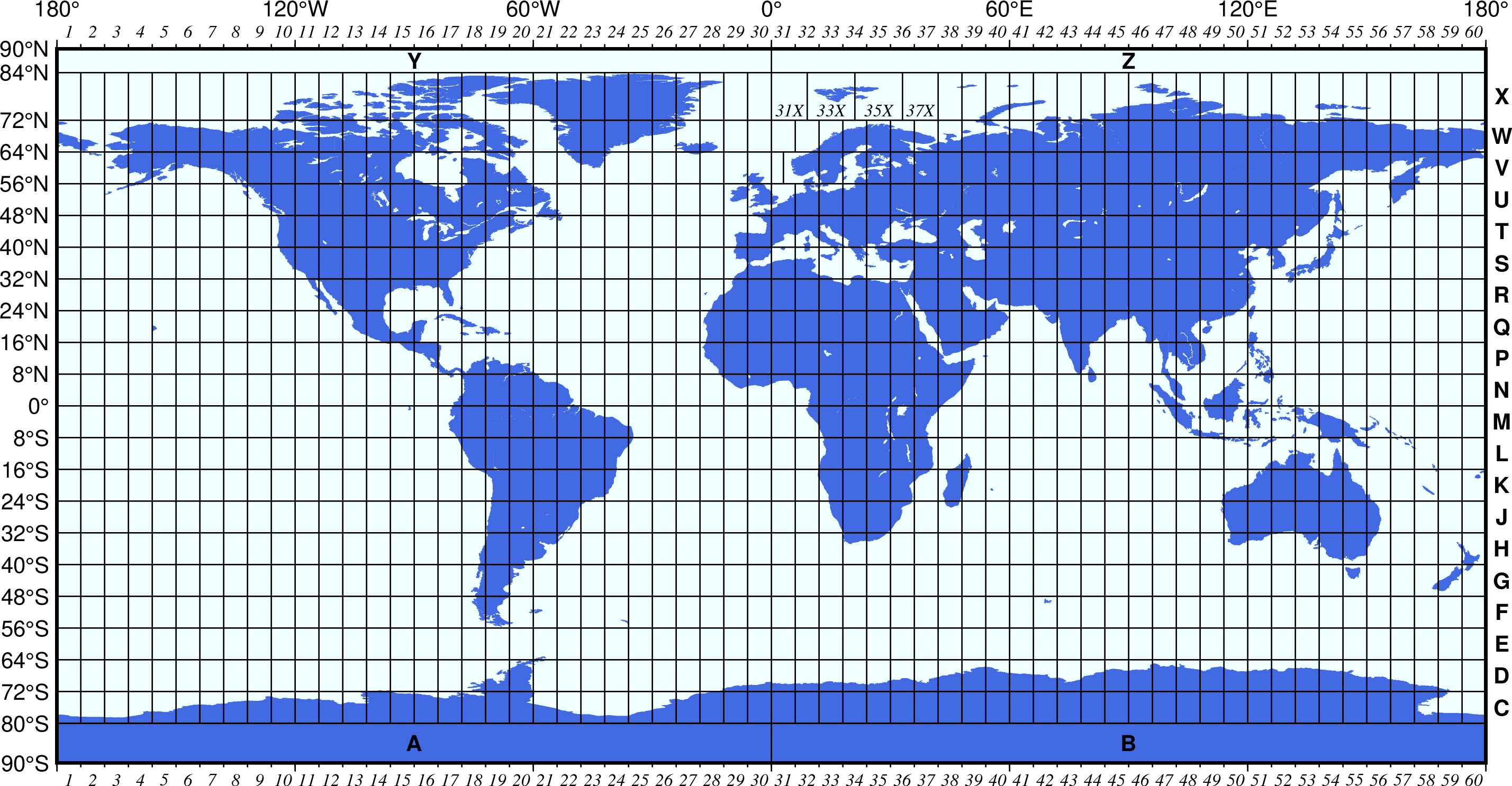
    🗺 方法 2:看世界 UTM 分带图

    水平 1–60 = 经度分带(每带 6°);垂直字母 C–X = 纬度分带(每带 8°)。N 字母及以后属于北半球M 字母及以前属于南半球

    UTM zones world map

    📐 方法 3:从经度计算(最精确)

    Zone = floor((经度 + 180) / 6) + 1 半球:纬度 ≥ 0 → N(北),< 0 → S(南)

    示例:
    北京 (116°E, 40°N) → floor((116+180)/6)+1 = Zone 50, N
    纽约 (-74°W, 40°N) → floor((-74+180)/6)+1 = Zone 18, N
    利马 (-77°W, -12°S) → floor((-77+180)/6)+1 = Zone 18, S
    悉尼 (151°E, -33°S) → floor((151+180)/6)+1 = Zone 56, S

    🔍 还是找不到?三种应急方法

    • 问做这份 DXF 的测绘师 / CAD 工程师,他们做图时一定知道
    • 看 DXF 文件名 / 图层注释,很多带 zone 信息(如 WGS84_UTM_50N_xxx.dxf
    • 打开 Google Earth,把任意一个坐标点拖进去,状态栏会显示当前 zone